Take Backup and Recovery Offsite
Extend Veeam backup and replication to a trusted service provider without building a second site, operating another console, or maintaining a VPN.

Master the 3-2-1 Rule Without a Second Site
Veeam Cloud Connect provides a fully integrated way to send backups and replicas offsite. Choose a Veeam Cloud & Service Provider, connect from the Veeam console, and use hosted resources for recovery without the cost and complexity of maintaining separate infrastructure.
Hosted Offsite Backups
Send backup copies to a hosted cloud repository through a secure connection.
Control From Veeam
Access hosted repositories, monitor consumption, and recover data from the familiar backup console.
Encrypted End to End
Protect data at the source, in flight, and at rest while retaining compression and WAN acceleration.
Add an Offsite Repository in Minutes
Cloud repositories appear directly in the Veeam backup infrastructure. There is no separate console or VPN to manage, and a single TLS port simplifies firewall configuration.
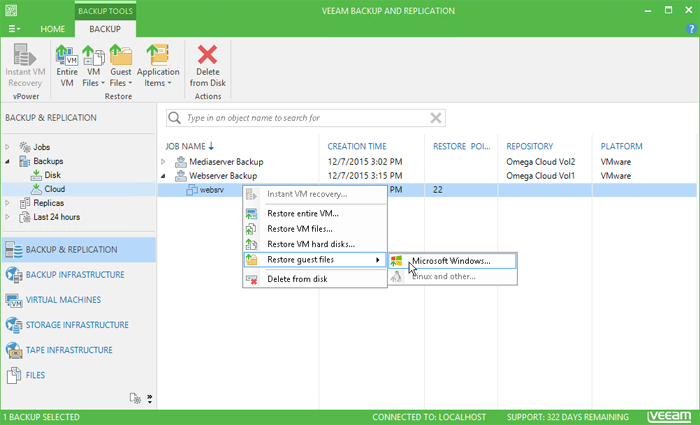
Recover Workloads Without Maintaining a DR Site
Replicate virtual machines to a provider-hosted cloud environment and orchestrate full-site or partial-site failover when disruption occurs.
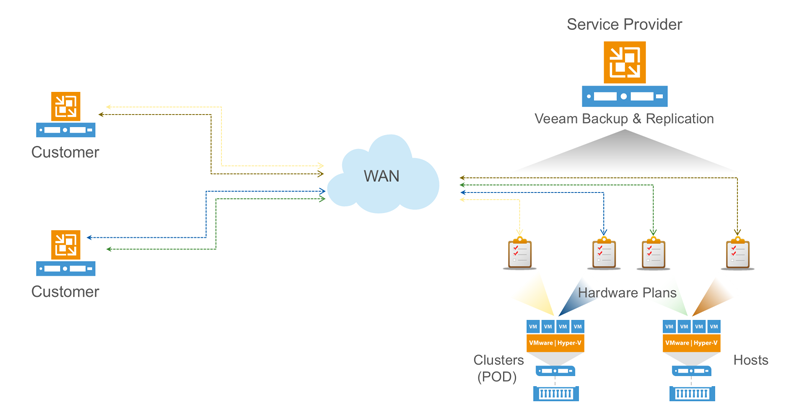
Connect, Protect, Recover
Choose a Provider
Select a Veeam Cloud & Service Provider and receive credentials for hosted resources.
Add the Connection
Enter the provider details in the Veeam console; repositories or cloud hosts appear in the infrastructure.
Apply Protection
Point backup copy or replication jobs offsite and recover through existing Veeam workflows.
Plan Your Cloud Connect Deployment
Review the product datasheet or talk with a specialist about hosted backup, replication, and disaster recovery requirements.