
Veeam Data Cloud for Salesforce
Safeguard Salesforce Data
Resilience for Salesforce data, files, and metadata
- Customizable protection and fast recovery
- Ensure data security and compliance
- Simple, all-inclusive pricing with unlimited storage
Overview
Shared Responsibility Model
There’s no arguing how business-critical Salesforce data and metadata are to an organization, but many organizations still either don’t have a backup strategy or are confident in their ability to recover. It’s your Salesforce data and metadata, and it’s your responsibility to protect it.
There are many things that can lead to data loss or corruption (even if accidental), including:
- Human error: There are many ways users can delete or corrupt data within Salesforce, whether it’s over-privileged users or implementing bad code.
- Integration error: Not taking the time to map out the flow can lead to overwriting data, duplicating data, or having the same field in different places.
- Accidental data corruption: Data is easy to move, meaning mistakes like overwriting and deletion are just as easy to make.
- Poor data hygiene: Keeping data longer than necessary or not deleting duplicative data leads to data sprawl and unnecessary fees.
Veeam Data Cloud for Salesforce
Secure your Salesforce environments with Veeam Data Cloud, a single cloud platform from the industry leader that unifies resilience for all SaaS apps and data.
Purpose-built for Salesforce and easy to use, Veeam Data Cloud protects, secures, and restores critical data and metadata to keep your business running. Better yet, advanced data management and monitoring capabilities empower you to meet compliance confidently while lowering TCO.
Benefits
More Than Just a Backup
Your Salesforce data, your responsibility. Secure your Salesforce environments with Veeam Data Cloud, a single cloud platform from the industry leader that unifies resilience for all SaaS apps and data.
Purpose-Built for Salesforce
Veeam Data Cloud simplifies data protection, security, and recovery to keep your business running. Plus, its advanced data management and monitoring features help you maintain compliance with confidence while reducing TCO.
Eliminate Downtime
Maintain productivity with automated, high-frequency backup and precise, fast recoveries of data and dependencies.
Mitigate Risks
Secure all your data while maintaining compliance through access control, encryption, and data masking.
Unlock Value
Leverage archiving, unlimited storage and sandbox seeding to lower TCO, all included in one predictable price.
Why Back Up Salesforce
Protecting Data is a Shared Responsibility
Organizations rarely think about backing up their Salesforce data until it is too late. Eventually, there will be some sort of incident - an accidental deletion, data loader mishap, or integration error - that will cause business-critical data loss. When this happens to you, how quickly will you be able to recover?
Protecting Salesforce is a Shared Responsibility. Even though Salesforce manages the infrastructure, it is your responsibility to protect your organization from Salesforce data loss and corruption. So, why not use a trusted industry leader like Veeam to keep your business running?
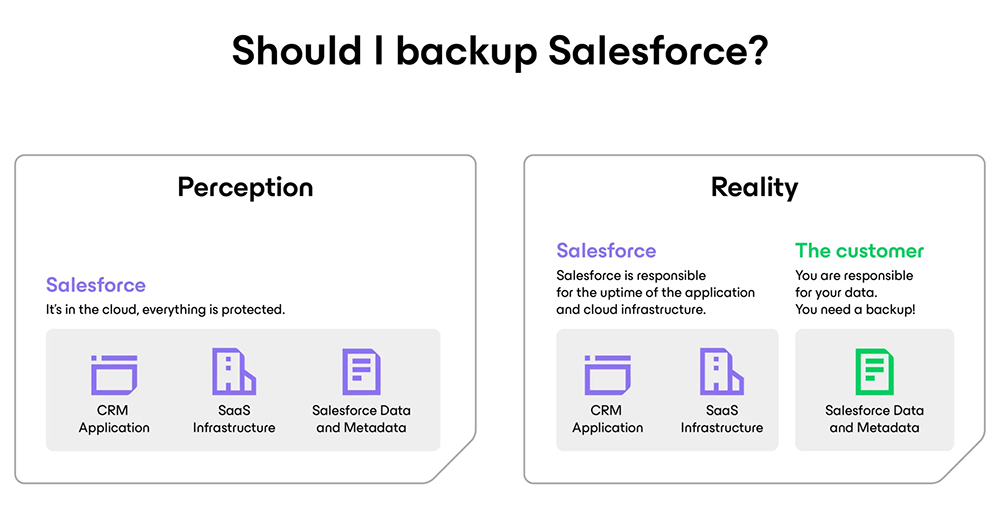
Salesforce backup perception versus reality. You need to back up Salesforce data and metadata.
Key Capabilities
Built for Salesforce
Confidently protect, secure, and manage your valuable Salesforce data with a unified cloud platform that features:
Data Archiving
Meet compliance requirements while freeing up Salesforce storage with included data archival.
Access Controlled
Eliminate vulnerabilities from over-privileged users and external threats through RBAC, MFA, and SSO.
Frequent Scheduling
Minimize data loss with automated backup, fully customizable to your schedule, at no additional cost.
Unlimited Storage
Maximize spend for innovation with predictably low pricing that includes unlimited storage.
Encryption
Extend Salesforce Shield Platform Encryption to secure sensitive data at rest from bad actors.
Granular Compare and Restore
Easily search, compare, and restore records and metadata quickly while keeping hierarchies intact.
Safe Sandbox Seeding
Leverage production-fresh data in sandboxes for dev/test, training, and more.
Data Masking
Ensure data security and privacy by masking sensitive information when seeding sandboxes.
Multi-Org Management
Protect data, metadata, and files across multiple organizations from a single, unified solution.
How It Works
Get Hands-On Right Here, Right Now
Discover how to securely protect and recover your Salesforce data, metadata, and files with this interactive demo.
Pricing And Packaging Options
Pricing for Salesforce Backup
Veeam keeps it simple with a licensing structure that aligns with your Salesforce usage.
Veeam is offered as an annual subscription with options ranging in years. Licenses are sold per Salesforce user and include Production 24.7.365 Support. Licensing of 100% of active Salesforce users is required.
Feature Comparison
Veeam gives you the flexibility to choose how you want to protect your Salesforce data. It is available as a Service or as self-managed, software-only options.
| Veeam Data Cloud for Salesforce | Veeam Backup for Salesforce | |
|---|---|---|
| Fully customizable backup scheduling | ||
| Granular compare and restore | ||
| Sandbox seeding | ||
| Data archiving | * | |
| SaaS solution | ||
| Unified management with other SaaS apps | ||
| All-inclusive pricing | ||
| Unlimited storage | ||
| Deploy on-premises or in the cloud |
* Only for Veeam Backup for Salesforce - Advanced
Frequently Asked Questions
Salesforce recommends that its customers develop a Salesforce backup strategy as part of their overall data management and security model.
Salesforce keeps a copy of your data as part of their disaster recovery (DR) plan (but not yours) and this does not include your metadata.
Using a third-party backup solution will ensure that you have your own copy of your data. Our solutions ensure you will have a copy of your data and metadata and offers almost continuous backup and filtered restoring options to help you meet recovery point objectives (RPOs) and recovery time objectives (RTOs).
Salesforce data refers to all your records, including Accounts, Contacts, Leads, Opportunities, Cases, Contracts, and other records. This can also include your custom objects, records, files, content, and Chatter. Salesforce metadata refers to all of your configuration settings, including custom fields, page layouts, reports, dashboards, and custom code like Apex and Visualforce. Adding or deleting custom fields, modifying page layouts, and changing reports and dashboards are commonplace for Salesforce Admins and Developers, which is why having metadata recovery options is crucial.
We currently support Sales, Service, Government, and Education Clouds. Critical Field Service data is now protected when your workforce is off-site.
If you plan on restoring deleted records from the recycle bin, 15 days is the amount of time you have to retrieve the deleted files before they are gone forever. Metadata cannot be restored from the recycle bin and must be manually recreated. Also, keep in mind that if a record was changed before deletion, you will only be able to retrieve the latest version, not previous versions. Organizations that use the recycle bin as a replacement for having a backup and recovery tool in place often find themselves unable to ever retrieve their business-critical data and metadata.
Archiving is part of our new “Advanced” offering. With data archiving, customers can avoid extra storage costs in Salesforce and maintain their existing storage limits. This feature allows users to transfer historical data and files from Salesforce to their chosen backup repository efficiently.
Yes. Veeam requires that 100% of Salesforce user licenses be protected.
Salesforce user licenses can fluctuate often since employees move in and out of an organization. It is a best practice to provide yourself with a small buffer between the exact number of used licenses and the total amount of licenses within an organization. Plus, as a data protection best practice, it is recommended that you license Salesforce backup software for the total number of Salesforce licenses, not just the total number of used Salesforce licenses.
Licenses are required for the following Salesforce user license types:
- Salesforce
- Salesforce Platform
Licenses are not required for other license types in Salesforce, including:
- Chatter Free, Chatter Only, Chatter External
- Partner Community, Partner Community Login, Customer Community Plus
- Identity
Sandbox users are not licensed.
With Veeam Backup for Salesforce, your data is protected through Single Sign-On (SSO) for streamlined, secure access, Multi-Factor Authentication (MFA) to prevent unauthorized logins, and advanced encryption in transit and at rest, ensuring your system stays secure from cyber threats and breaches.
Salesforce provides four different editions of Salesforce Sales Cloud and Service Cloud. These include Essentials, Professional, Enterprise, and Unlimited editions. Only Salesforce Enterprise and Unlimited editions include the APIs that are needed to create Salesforce backups for your Salesforce environment. Veeam requires that organizations use either the Enterprise or Unlimited edition of Salesforce. The Professional edition can also be used with the API add-on.
Veeam Backup for Salesforce gives you the ability to deploy your Salesforce data to the place that works best for your business needs, whether that’s on-premises, in AWS, Azure, or another location. Deployment, security, and data are fully managed by the customer, so the company will always retain access and control of their data. You can also choose the cloud that best complies with your company’s security model and compliance requirements to retain complete control of your data.
With incremental sync and flexible scheduling, you can efficiently back up your Salesforce data and metadata almost continuously by optimizing Salesforce APIs, while maintaining full control over API call limits. You can customize backup schedules and retention settings at the object level, ensuring rapid data protection, with the ability to back up objects as frequently as every five minutes at no extra cost. Additionally, the system supports auto-discovery of new objects and fields for seamless, up-to-date protection.
Both Veeam Data Cloud for Salesforce and Veeam Backup for Salesforce include Product 24.7.365 Support. The Community Edition of Veeam Backup for Salesforce includes best-effort support by email only.